Deploying on a Friday is tricky: the work week is gone, tired brains check out, the work cape goes off and people go to their families and hobbies during the weekend. But the overseas team had things to deploy, the kind of critical updates that keep the business afloat, so they deployed on Friday. It was a silent deploy, no kudos or hashtagged messages on the channel, after all, it was 11pm and everyone was out already.
Monday comes, business as usual, humans start materializing on their desks and lining in front of the coffee dispenser while the office comes to life. I reach to my desk, an all-white behemoth that’s too big for my setup: a company macbook, my red coffee mug and wireless headsets. I like it that way. No external keyboards, mouse or multiple monitors, just a simple, focused setup where I can dedicate all my attention to designing on Figma and writing code. So I sat down, clocked in and dove straight into the Figma file I had been working in on Friday. My notes quickly helped me pick up where I left, so I knew getting into flow mode was guaranteed within the next 20 minutes.
10 minutes in, I get an ominous message: “Bryan. 100s of articles gone from the CMS and our SEO score fell during the weekend. This is urgent.”
I took a deep breath, letting go of the idea of getting into flow mode and prepare my mind for forensics. We jump on a call, I confirm the damage, 146 entries are completely gone. Confused, I open the repository to see the latest commits on the production branch.
Last commit, Friday around 11pm.
But that was not the scary part: That CMS was git-powered, so any time our copywriter posted something new, the project was supposed to commit the changes to the production branch on its own, but there were no records of any pushes during the last 2 months.
And that was when my heart rate went up.
For the less technical, on a repository, as long as changes are registered, the content can be recovered. In this case, our guy had been crafting and posting custom articles for 2 months and now it was all completely gone.
We called the dev team that pushed the update and reported the problem. I did not have access to the production server, but they did. So they took over the forensics and found out that the server had been logging git errors for the last 2 months. So, every time our guy published something, the CMS tried to push it to the repository, but the server didn’t have permission (expired token. Guess when? 2 months ago).
So, the dev team did some magic and were able to restore all the content, which was a relief for everyone, but the question remained:
How do we make sure this does not happen again?
The marketing team had been driving paid traffic during the entire weekend to pages that did not exist. The money was gone, and our SEO score took a dive.
This unprecedented issue exposed a huge risk and weakness we had: lack of observability and reporting on the status of our web assets. And now we had to do something about it.
- The dev team would take care of token renewal, strengthen the CI/CD pipeline and set up notifications any time the server containing our CMS threw an error.
- Our copywritter would report the amount of new articles added everyday.
- I was appointed as the git checker, to cross-check the amount of new entries againts new commits on the
productionbranch. - I was also appointed with the task of periodically checking all CMS URLs to ensure all of them were accessible.
Number 3 would be just a little reminder; a 2 minute task at the end of the day. But number 4, I hated that one. I had so much design and frontend work to do, and I knew checking all routes in a CMS with hundreds of entries would be a time-consuming task of colossal proportions. Thus from the very beginning I mentally refused to do it.
I refused to manually check all that. But since my team trusts me and rely on me, I had to deliver the desired output:
To ensure that all CMS URLs were accessible
That was an epiphany. My manager tasked my with checking the URLs, but he never said “how”. I realized what I hated was the first version of checking that came to my mind. All of a sudden, it was not a chore. It became an interesting puzzle to solve.
Having the right attitude does magic and gets you unstucked fast. As I was brainstorming on ways to getting rid of the manual part of the task, I opened the workflow management app I built for the team and thought, this entire checking thing could be a new module and live inside this app. So I opened a notepad and started drafting the requirements. Not thinking about the technical aspects of it, but rather thinking on how to make my life easier while getting the job done.
After an extensive note, re-drafted 4-5 times, I copied the entire text, opened cursor and checked out a new branch. It didn’t come out polished and fully functional at once, but after 2 hours of iterations, corrections and refinement, it came out like this:
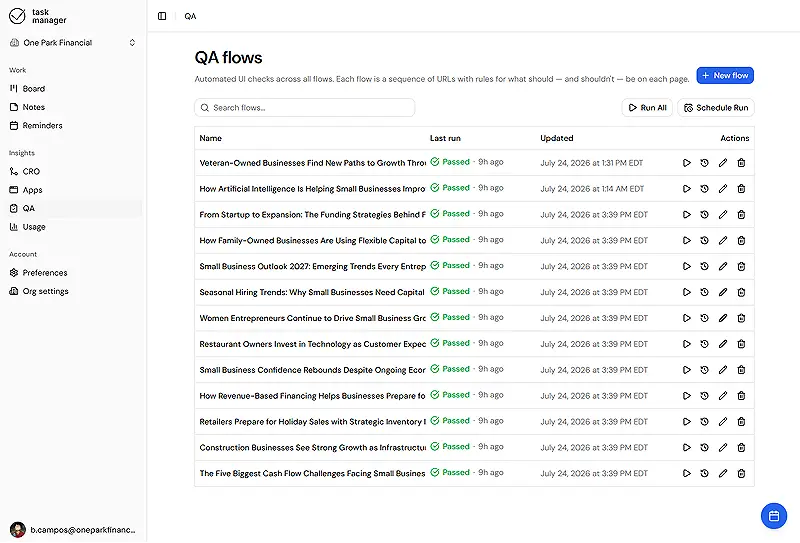
But having to click “run” on each one of hundreds of qa flows felt like a chore too, so I thought, the right approach for myself or anyone else using this tool is automation.
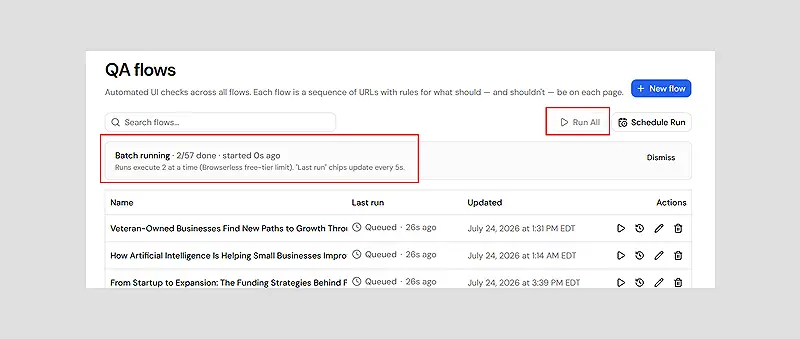
One click should be enough to run all checks or schedule them.
So I abstracted all the concurrence into the crawling API, leaving just two simple buttons to guide the experience:
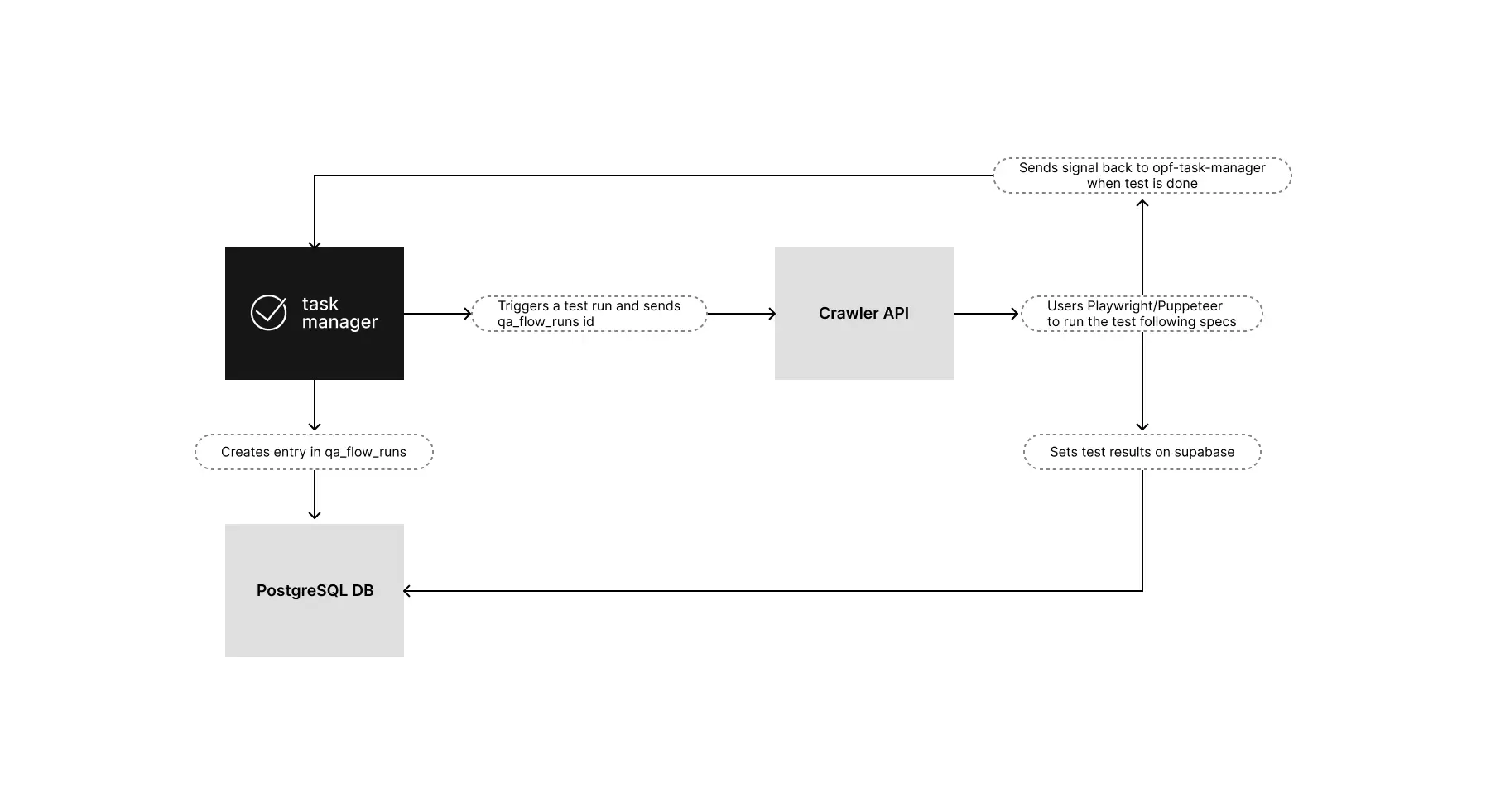
By the time I considered the mission done, I ended up with a few nice things all wired up and ready for anyone with access to the workflow tool:
And that’s a quite roundabout way of telling how I got rid of work I did not want to do while doing what I love doing.